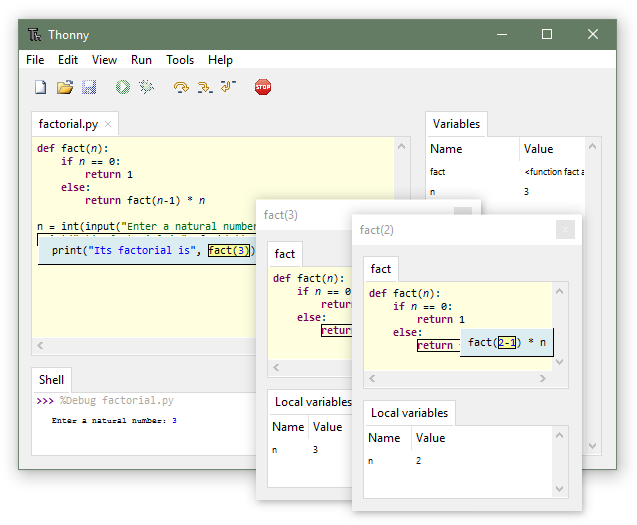
Thonny does one job unusually well: it teaches Python without hiding how Python works. The variable window shows exactly what each name points to, the debugger steps through function calls the way a human would explain them, and the packaging is a single installer that gets a beginner running in one click. The trouble comes about six months in. A student writing anything more ambitious than a single-file script starts noticing that Thonny has no real project system, sparse plugin support, and no language server. We tested 7 Thonny alternatives on Windows, macOS, and Linux for students ready to graduate off Thonny and for teachers who need something almost as clean.
The picks below cover the free educational IDE that ships with Python itself, a couple of teaching-focused rivals, and the general-purpose Python IDEs that a Thonny graduate will meet in industry. Each is judged on install friction, quality of the debugger for beginners, ability to explain what the code is doing, and how well the same project carries into a professional workflow.
Quick comparison
| App | Best for | Free plan | Platforms | Standout feature |
|---|---|---|---|---|
| IDLE | The absolute basics | Ships with Python | Windows, macOS, Linux | Zero install beyond Python itself |
| Mu Editor | Kids and hardware learners | Fully free | Windows, macOS, Linux | Modes for micro:bit and CircuitPython |
| Visual Studio Code | Growing into professional work | Fully free | Windows, macOS, Linux | Language-server-powered autocomplete |
| PyCharm Community Edition | Full Python IDE | Fully free | Windows, macOS, Linux | Deep refactoring and test tooling |
| Wing Personal | Focused Python IDE | Free tier | Windows, macOS, Linux | Best-in-class debugger |
| Spyder | Scientific Python | Fully free | Windows, macOS, Linux | Variable explorer like Thonny’s, plus SciPy |
| Jupyter Notebook | Explaining and teaching code | Fully free | Windows, macOS, Linux, web | Cells and inline plots |
Why people leave Thonny
No real project system
Thonny is single-file friendly and multi-file uncomfortable. Anything with more than a few modules loses the “everything is visible at once” advantage that made Thonny great to begin with.
Autocomplete is not language-server-quality
Type-in-line hints work for the standard library and simple imports. Anything more sophisticated — libraries with dynamic attributes, complex type hints — gets missed. VS Code and PyCharm have moved past this.
Virtual environment handling is basic
Thonny handles venvs but not comfortably. poetry and uv require dropping to a terminal, which defeats a lot of Thonny’s teaching value.
The alternatives
IDLE — best absolute-minimum starting point
IDLE ships with every Python install. It’s the tool the Python tutorial assumes you’re using. A REPL, a basic editor, and a debugger — nothing more.
Where it falls short: the debugger is primitive and IDLE has no variable explorer. Compared to Thonny it feels a decade older, because it is.
Pricing: Free, part of the Python installer.
vs Thonny: simpler and lower-friction, but with far less educational scaffolding.
Download: IDLE (via Python)
Bottom line: the answer when the environment can’t install any additional software.
Mu Editor — best for kids and hardware learners
Mu Editor is aimed squarely at kids and hardware-oriented learners. Dedicated modes for micro:bit, Raspberry Pi Pico, and CircuitPython make hardware projects a two-click setup.
Where it falls short: intentionally simple. Anyone past first projects will outgrow Mu quickly.
Pricing: Free.
vs Thonny: narrower focus, better for hardware, worse for general Python learning.
Download: Mu Editor
Bottom line: the correct choice for a classroom running physical-computing lessons.
Visual Studio Code — best growing-up path
Visual Studio Code with the Python extension is the tool most Thonny graduates end up on. Pylance provides the language-server intelligence, the debugger integrates cleanly, and Jupyter notebook support is built in.
Where it falls short: the extension marketplace and terminal-oriented workflow overwhelm a fresh beginner. VS Code assumes you’re comfortable configuring things.
Pricing: Fully free.
vs Thonny: far more capable, less friendly for absolute beginners.
Download: Visual Studio Code
Bottom line: the natural next step after Thonny stops being enough.
PyCharm Community Edition — best full Python IDE
PyCharm Community Edition is the free tier of the JetBrains Python IDE. Deeper refactoring than VS Code, integrated test running, and the same interaction model as CLion or IntelliJ.
Where it falls short: heavier on RAM than VS Code. Slower first-run indexing on a large project.
Pricing: Free.
vs Thonny: professional-grade, and worth the switch the moment a student writes their first multi-file project.
Download: PyCharm Community Edition
Bottom line: the right pick when Python becomes a serious pursuit, not just a class.
Wing Personal — best focused Python IDE
Wing Personal is a small IDE that puts the debugger at the centre of everything. Conditional breakpoints, step-into with live variable inspection, and remote debugging that beats any of the others in the free tier.
Where it falls short: the interface looks a generation behind VS Code and PyCharm. Community is smaller.
Pricing: Free personal tier, paid Pro tier for more advanced features.
vs Thonny: far more capable debugger, similar single-purpose feel.
Download: Wing Personal
Bottom line: the right pick for anyone whose Thonny use is 80% debugger.
Spyder — best scientific Python IDE
Spyder is what happens when you build an IDE for data scientists. Variable explorer like MATLAB’s, plot panel, and full integration with the SciPy stack.
Where it falls short: the general-purpose editing experience trails VS Code and PyCharm. Great for notebooks and scripts, weaker for large applications.
Pricing: Free.
vs Thonny: the closest match in “explain what my code sees” ergonomics, plus real scientific tooling.
Download: Spyder
Bottom line: the strongest pick when the class is data-oriented.
Jupyter Notebook — best for teaching and explaining
Jupyter Notebook doesn’t quite compete with Thonny — it’s a different medium. Cells of code and prose interleave, plots render inline, and the whole notebook is shareable as one file.
Where it falls short: notebooks are painful for large multi-file projects. Version control on .ipynb files needs extra tooling.
Pricing: Free.
vs Thonny: better for reading and writing about code; worse for building an application.
Download: Jupyter
Bottom line: the right pick when the deliverable is a shared, narrated notebook rather than an application.
How to choose
Pick IDLE when nothing else can be installed. Pick Mu Editor for kids or hardware. Pick Visual Studio Code as the general “next step” after Thonny. Pick PyCharm Community Edition for a full IDE experience. Pick Wing Personal for debugger-heavy workflows. Pick Spyder for data science. Pick Jupyter Notebook for teaching and shared analysis. Stay on Thonny for the first three months of any Python journey.
FAQ
Is Thonny good for kids? Yes, one of the best. Mu Editor is a close second, especially with hardware.
What comes after Thonny? Visual Studio Code for most people; PyCharm Community for those planning to write larger projects.
Which alternative has a Thonny-like variable explorer? Spyder is the closest. PyCharm has a similar debugger view.
Is PyCharm Community free forever? Yes, the Community Edition is free with no time limit. The paid Professional Edition adds web and data science tooling.
Can I use these on a Raspberry Pi? Thonny ships with Raspberry Pi OS. Mu, Visual Studio Code, and Jupyter also run well on Pi.